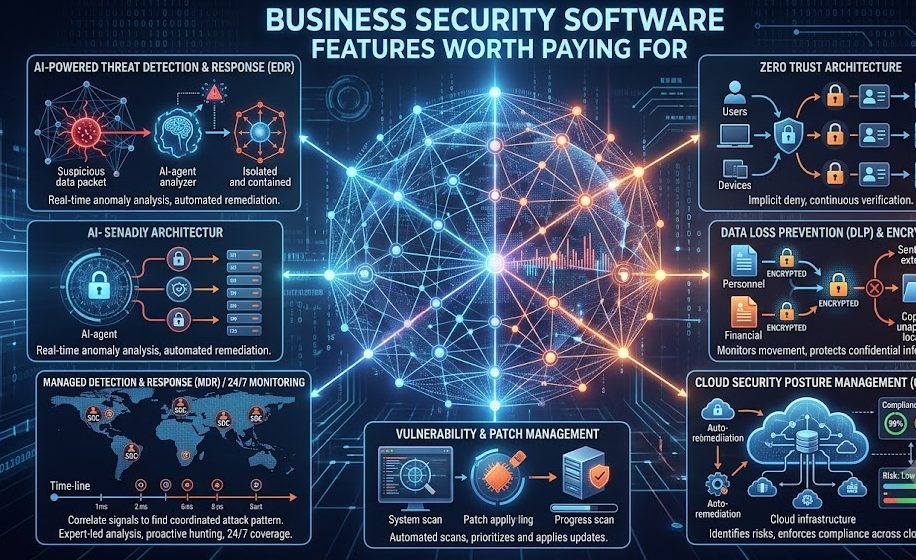
Business security software is no longer a luxury purchase. For many companies, it is a necessary investment that protects customer data, employee accounts, payment information, business files, and daily operations. But not every security feature is equally valuable. Some tools look impressive on a pricing page but may not provide real protection for everyday business risks. The smartest approach is to understand which security software features are actually worth paying for and why they matter.
Modern businesses depend on email, cloud storage, websites, payment systems, remote access, customer databases, and connected devices. Every one of these areas can become a target for cybercriminals. A good security platform should help prevent attacks, detect suspicious activity, reduce human error, and support fast recovery if something goes wrong.
◆ Why Paid Security Features Matter
Free or basic tools may offer simple antivirus protection, but businesses usually need stronger layers such as endpoint security, ransomware defense, identity protection, email filtering, cloud controls, and centralized management. These features reduce risk and help teams respond faster.
1. Real-Time Threat Detection
Real-time threat detection is one of the most important features worth paying for. Instead of scanning only when the user starts a manual check, real-time protection continuously monitors devices, files, downloads, websites, and system behavior.
This matters because cyber threats can act quickly. A malicious file, unsafe link, or infected attachment can cause damage within minutes. Real-time detection helps stop suspicious activity before it spreads across business systems.
- Continuous background monitoring.
- Suspicious behavior detection.
- Automatic quarantine of harmful files.
- Instant alerts for serious threats.
- Protection against unknown malware patterns.
2. Ransomware Protection
Ransomware is one of the most damaging threats for businesses. It can lock important files, stop operations, and create major recovery costs. A strong business security tool should include dedicated ransomware protection, not just basic antivirus scanning.
Good ransomware defense watches for unusual file activity, blocks suspicious encryption attempts, and helps protect backup systems from being attacked.
◆ Useful Ransomware Defense Pattern
- Detects mass file changes.
- Blocks unauthorized encryption behavior.
- Protects sensitive folders.
- Alerts admins quickly.
- Works with secure backup plans.
3. Email Security and Phishing Protection
Many business attacks begin with email. A fake invoice, delivery notice, password reset message, or payment request can trick employees into clicking harmful links or sharing login details. Because email is used daily, phishing protection is one of the most valuable paid security features.
Email security tools can scan attachments, check links, detect suspicious senders, and block messages that appear dangerous. This reduces the chance of employees becoming victims of social engineering attacks.
| Email Risk | Protection Feature |
|---|---|
| Fake login pages | Link scanning |
| Malicious files | Attachment scanning |
| Business email scams | Sender verification |
| Spam attacks | Filtering rules |
4. Endpoint Protection for All Devices
Every laptop, desktop, tablet, and mobile device connected to business accounts can become a security weakness. Endpoint protection secures these devices by monitoring activity, blocking threats, and enforcing security policies.
This feature is especially useful for businesses with remote teams, hybrid workers, or employees who use multiple devices. If one device becomes infected, endpoint protection can help contain the issue before it affects the entire organization.
5. Centralized Admin Dashboard
A centralized dashboard is worth paying for because it saves time and improves visibility. Business owners or IT teams can see device status, security alerts, software updates, and risky activity from one place.
Without centralized control, it becomes difficult to know whether every device is protected. Some employees may ignore updates, disable protection, or miss important warnings. A dashboard helps keep security consistent across the business.
- View protected and unprotected devices.
- Receive security alerts.
- Apply policies across teams.
- Track outdated software.
- Manage users and permissions.
6. Multi-Factor Authentication Support
Passwords alone are no longer enough. If an employee password is stolen, attackers may gain access to email accounts, customer records, cloud files, or payment systems. Multi-factor authentication adds another verification step, making unauthorized access much harder.
Security software that supports identity protection and authentication controls can help businesses reduce account takeover risks.
◆ Authentication Pattern
- Password plus mobile verification.
- Password plus authenticator app.
- Password plus hardware security key.
- Login alerts for unusual locations.
- Access blocking for suspicious attempts.
7. Data Backup and Recovery Tools
Even the best security software cannot guarantee that every threat will be blocked. That is why backup and recovery features are worth considering. If files are deleted, corrupted, encrypted, or lost, reliable backups can help restore business operations quickly.
A good backup feature should be automatic, encrypted, and easy to restore. Businesses should also test backups regularly to make sure recovery actually works when needed.
8. Web Protection and Safe Browsing
Employees may accidentally visit unsafe websites, download infected files, or click links that lead to fake login pages. Web protection helps block dangerous websites before they load and warns users about risky pages.
This feature is useful for reducing malware infections, credential theft, and browser-based attacks.
- Blocks malicious websites.
- Scans downloads.
- Warns about suspicious links.
- Reduces exposure to fake login pages.
- Protects users during daily browsing.
9. Cloud Security Controls
Many businesses store documents, customer records, reports, and team files in cloud platforms. Cloud tools are convenient, but poor settings can expose sensitive information. Security software with cloud protection helps monitor access, detect risky sharing, and protect data stored online.
This feature is especially valuable for businesses using remote teams, shared folders, and online collaboration tools.
◆ Cloud Risk Pattern
- Files shared with the wrong people.
- Weak account passwords.
- No login monitoring.
- Unsecured document links.
- Former employees retaining access.
10. Reports, Alerts, and Compliance Support
Security reports help businesses understand what is happening across their systems. Alerts notify admins when threats appear, while reports show trends, weaknesses, and areas needing attention.
For businesses that handle customer information, financial data, or regulated records, reporting features can also support internal reviews and compliance documentation.
| Feature | Business Value |
|---|---|
| Threat Alerts | Fast response to attacks |
| Activity Reports | Better visibility |
| User Logs | Accountability |
| Compliance Records | Audit support |
◆ Features Worth Paying For Pattern
- Real-time threat detection.
- Ransomware protection.
- Email and phishing defense.
- Endpoint protection.
- Central admin dashboard.
- Multi-factor authentication support.
- Backup and recovery tools.
- Web protection.
- Cloud security controls.
- Reports and security alerts.
Final Thoughts
Business security software should not be judged only by price. The real value comes from features that reduce risk, save time, protect sensitive data, and help the business recover quickly from security problems.
Features such as ransomware protection, email security, endpoint defense, multi-factor authentication, cloud security, backups, and centralized management are often worth paying for because they protect the areas where businesses face the highest risks.
The best security software is the one that matches the business environment, supports daily operations, and provides clear protection without creating unnecessary complexity. A strong security investment today can prevent much larger losses tomorrow.