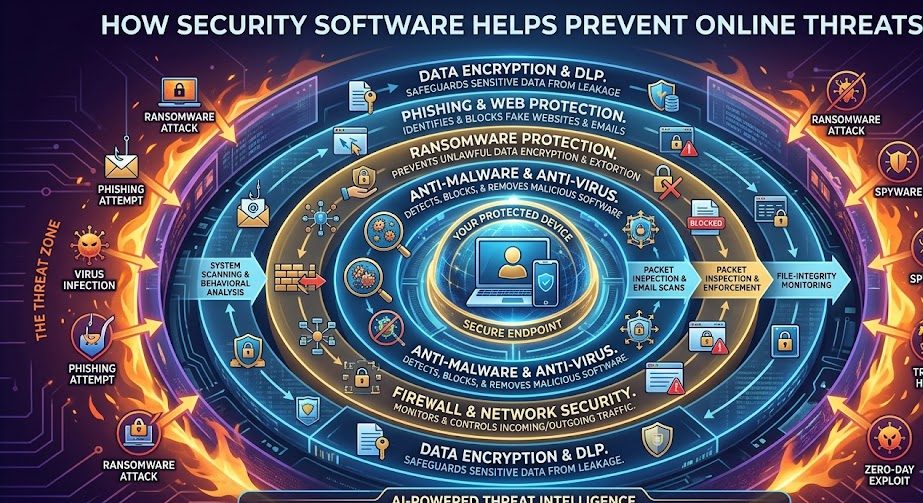
The internet has transformed the way individuals and businesses communicate, shop, work, and manage information. While online technology offers incredible convenience and opportunities, it also introduces various security risks. Cybercriminals continuously develop new methods to steal personal information, spread malware, compromise systems, and exploit security weaknesses. As these threats become more sophisticated, security software has become one of the most important tools for protecting devices, networks, and sensitive data from online attacks.
Whether someone is browsing websites, checking email, conducting online banking, or managing a business network, digital threats are constantly present. Security software works behind the scenes to detect, prevent, and respond to these threats before they can cause serious damage. Without proper protection, individuals and organizations face increased risks of financial loss, identity theft, data breaches, and operational disruption.
🛡️ Why Online Threats Continue to Grow
Cybercriminals target internet users because valuable information is stored and shared online every day. Personal details, passwords, financial records, business documents, customer databases, and confidential communications all represent attractive targets. As technology evolves, attackers continue developing new techniques designed to bypass traditional defenses and exploit vulnerable systems.
Understanding Common Online Threats
Before understanding how security software helps, it is important to recognize the types of threats that exist online. Different threats require different layers of protection, which is why modern security solutions include multiple defensive features.
| Threat Type | Description |
|---|---|
| Malware | Malicious software designed to damage or compromise systems |
| Ransomware | Encrypts files and demands payment for access |
| Phishing | Fraudulent messages designed to steal information |
| Spyware | Secretly monitors user activity |
| Identity Theft | Unauthorized use of personal information |
| Network Attacks | Attempts to access systems without permission |
Real-Time Threat Detection
One of the most valuable functions of modern security software is real-time threat detection. Instead of waiting until a threat has already caused damage, security programs continuously monitor activity and identify suspicious behavior as it occurs.
Real-time monitoring helps detect malicious files, unusual system activity, dangerous downloads, and unauthorized access attempts before they can compromise devices or networks.
Blocking Malware and Viruses
Malware remains one of the most common online threats. Cybercriminals distribute malicious software through infected websites, email attachments, software downloads, and compromised advertisements.
Security software scans files and programs for known malicious signatures while also analyzing behavior patterns that may indicate suspicious activity. When a threat is detected, the software can quarantine or remove it before it affects the system.
This layer of protection helps prevent data loss, system corruption, and unauthorized access to sensitive information.
Protecting Against Phishing Attacks
Phishing attacks are designed to trick users into revealing passwords, financial information, or confidential business data. These attacks often appear as legitimate emails, websites, or messages from trusted organizations.
Modern security software helps identify suspicious links, fraudulent websites, and deceptive communications. Many solutions include browser protection that warns users before they visit potentially dangerous websites.
⚠️ Phishing Remains a Major Risk
Even experienced internet users can occasionally fall victim to sophisticated phishing attempts. Security software adds an important layer of protection by identifying threats that may not be immediately obvious.
Preventing Ransomware Attacks
Ransomware has become one of the most damaging forms of cybercrime. Attackers encrypt files and demand payment in exchange for restoring access. Businesses, government organizations, and individuals have all been affected by ransomware incidents.
Security software helps identify ransomware behavior before files become encrypted. Advanced solutions monitor file activity and block suspicious processes that attempt to modify large numbers of files unexpectedly.
Many platforms also provide backup protection and recovery features that help minimize damage if an attack occurs.
Securing Internet Browsing
Every website visited represents a potential security risk. Some websites contain malicious code, deceptive advertisements, or compromised content designed to infect visitors’ devices.
Security software helps protect browsing sessions by:
- Blocking dangerous websites.
- Scanning downloads for malware.
- Detecting suspicious browser activity.
- Preventing unauthorized redirects.
- Identifying potentially harmful scripts.
These protections help create a safer online experience while reducing exposure to hidden threats.
Protecting Personal Information
Personal information has become increasingly valuable to cybercriminals. Names, addresses, passwords, banking details, and identification numbers can all be used for fraud and identity theft.
Security software helps protect sensitive information through encryption, secure browsing tools, password protection features, and monitoring capabilities that identify suspicious attempts to access personal data.
🔐 Information Worth Protecting
- Passwords and login credentials.
- Financial information.
- Business records.
- Customer databases.
- Personal identification details.
- Private communications.
Network Security Protection
Cybercriminals often attempt to gain access to devices through network vulnerabilities. Security software includes firewall technology that monitors incoming and outgoing traffic, helping block unauthorized connections.
Firewalls act as security barriers between trusted systems and potentially dangerous external networks. By filtering traffic and monitoring communication attempts, they reduce the likelihood of unauthorized access.
Automatic Updates and Threat Intelligence
Cyber threats evolve constantly. New malware variants, attack techniques, and vulnerabilities emerge every day. Security software providers continuously research emerging threats and release updates to strengthen protection.
Automatic updates ensure users benefit from the latest threat intelligence without requiring manual intervention. This helps maintain protection against newly discovered risks.
Additional Security Best Practices
While security software plays a critical role, users should combine it with good cybersecurity habits.
- Use strong and unique passwords.
- Enable multi-factor authentication.
- Avoid suspicious downloads.
- Verify email senders before clicking links.
- Regularly back up important files.
- Install software updates promptly.
- Monitor accounts for unusual activity.
💡 Online Safety Checklist
- Install reliable security software.
- Keep systems and applications updated.
- Use secure passwords.
- Enable additional authentication measures.
- Be cautious when opening attachments.
- Regularly back up important information.
- Monitor security alerts and warnings.
Final Thoughts
Online threats continue to evolve, making cybersecurity more important than ever. Security software serves as a critical defense system that helps detect, prevent, and respond to cyber threats before they can cause significant harm.
From malware protection and phishing prevention to ransomware defense and network security, modern cybersecurity solutions provide multiple layers of protection designed to keep users safe in an increasingly connected world.
While no security solution can eliminate every risk, combining reliable security software with responsible online habits significantly improves protection and helps individuals and businesses navigate the digital landscape with greater confidence.